 The Basics of Retouching People, Part 2
 |
 Spot Healing Brush to the Rescue!
 |
 Give Your Photos an Edge
 |
 Eyes of the Otherworld
 |
 Quick Polaroid Frame
 |
Using the Crop tool to increase canvas size |
 Holiday Cards
 |
Scanning Secrets |
|
Fabulous Feathers |
 Super Sparkling Eyes
 |
 Turning New into Old
 |
Pixel Super Sleuthing |
 Get Sharp!
 |
 Color Shifting Made Easy
 |
|
The Beginner's Guide to Image Editing, Part 2 |
 Halloween Fun with Elements
 |
 Easy Embellishments
 |
 Fast Photo Spotlight
 |
 Build a Custom Twitter Background in Photoshop
 |
Secret Layer Masks |
 Shadow Dancing
 |
 Placing Text Behind an Object
 |
 Simply Statues
 |
Photoshop CS2 Survival Guide |
 Serious Red-Eye Fixer Upper
 |
 Selecting Frizzy Hair
 |
 Faux Finished Photo Edges
 |
 Fall Leaf Photo Frame
 |
 Replacing Backgrounds with Photoshop's Background Eraser
 |
 Photo Favorites
 |
|
Painted Edges in Elements |
Tips for Better Text, Pt. 2 |
 A Stroll Down Blend Mode Lane, Pt. 5
 |
 Creative Curls
 |
 Polaroid in a Picture
 |
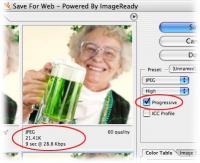
Fast uploading |
|
Managing Photos with Bridge CS4, Part 2 |
 Correcting shadows and highlights
 |
 How to Create Your Very Own Warp Trail
 |
Say hello to advanced red-eye and retouching tools |
|
Burn baby burn! |
The Beginner's Guide to Image Editing, Pt. 3 |
 Photo-Type
 |
Fade to White |
 The Secret to Round Edges
 |
 Creating Cartoon Art
 |
 Creative Combinations, Pt. 2
 |
 Easy Clipping Groups
 |
|
Pick a New Picker |
 How to make a drive-free Desktop
 |










 ©Copyright 2004-2026 Lesa Snider